
Book-Making Course - How to Create High-Quality Photo Books
Digital photo book design and printing course for all photographers (enthusiasts & pro) - 6 hours
Learn from a professional graphic designer and award winning photo book creator how to produce your own professional-looking photo book.
Learn from a professional graphic designer and award winning photo book creator how to produce your own professional-looking photo book.
If you have hundreds of photos on your computer's hard-drive - never to be viewed again - why not create a beautiful photobook of your favourite images taken on that holiday of a lifetime or photographs of your child's first year? A great way to showcase your photos and share with family and friends. A well-designed printed photobook not only looks impressive on your coffee table but it will also last for years.
If you've been thinking about making a photobook but not sure how to start, then this workshop will guide you through the process: from selecting your best photos, to page design layout and the final step of uploading online your final book layouts for professional printing.
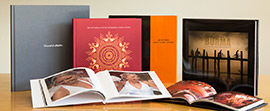 Digital print-on-demand photobooks have become the popular contemporary alternative to the traditional photo album. They also make stylish photographic portfolios. However, trying to make a photobook yourself without the necessary knowledge - technically and creatively - to get the best out of your photos, may result in it not being quite like the printed photobook you envisaged. With some advice and expertise from our professional book designer Sarah, you will soon be able to start creating your own personal bookstore-quality photobook.
This 6 hour workshop is for photographers who have made a photobook before or for those who have wanted to but haven't got round to it. Through demonstrations and hands-on tuition you will learn the importance of image preparation - selecting and editing your best quality images, correct pixel resolution for printing, colour management, book size formats, book concepts and themes, image-sequencing, how to create good page designs, selecting type fonts and adding text to your pages, when to add colour backgrounds, designing an eye-catching front cover and finally exporting your book to the print company for printing and binding. You will also understand how following a book-making workflow will save you time.
Sarah the instructor will provide tips and recommendations as to the differences on various photobook printing companies, paper stocks, cover options, as well as sample printed photobooks for you to view.
Participants of this course will learn how to design their own photobook on their own laptops using the book-making software from Momento (available as a free download from www.momento.com.au). For those who also have a desktop home computer as well as a laptop, the Momento software can also be installed onto their desktop computer with the same log-in acct name, whereby future photobooks can then be created. Sarah will also suggest a couple of other photobook making software companies as an alternative to Momento.
Next course dates: There are currently no scheduled book-making workshops running. Please email if interested in cost for private bookmaking training
Time: 10am-4pm
Cost: $240 incl hand-out notes.
Book this photobook course with our Lightroom image-editing workshop together and pay only $445 for both (saving $30) ‘Lightroom for Photographers’ (Private 4-6hrs photo book-making training is also available - please email for rates)
Pre-requisite: Must have basic computer skills.
Course duration: 6 hours (demonstrations and hands-on workshop)
Group size: small groups - max 4 persons. Participants are required to bring your own 13, 15" or 17" laptop with Momento Photo Book software already installed to use. (Available as a free download from www.momento.com.au - check computer system requirements first and download relevant MAC or PC version of software). 13'" laptops are ok to use for this course. 11" laptop computers are not suitable for this course.
Course suitable for: Photographers (enthusiasts & professional) who wish to create a photographic book of a series of images or photography project, mums and dads wanting to make a special book of photos of their children, any photographer who loves travel and wants a souvenir book of photographs from a memorable holiday. Photobooks have a variety of possibilities and uses. This workshop is for first time book-makers who have have never made a photo book, to those who have some experience of book-making but want to pick up some tips and recommendations from a professional book designer.
How to book course: Book this course now via the booking page email us via the contact form if any questions.
Location: Training room in Sydney city CBD or studio in Eastern Suburbs close to CBD Sydney. (full address emailed on booking confirmation). Train station walking distance to both locations and parking available
Course instructor: Sarah Jenkins - photographer & graphic designer.
Sarah is a freelance photographer, graphic designer and photography training instructor. She has more than 20 years experience in both the photography and graphic design fields, working for well-respected design agencies in London and Sydney. During her graphic design career as an art director, Sarah's expertise in print design was highly-regarded amongst Sydney's design consultancies.
In addition to teaching photography courses (SignaturePhoto), Sarah is also the director of SignatureBook which provides high-end, custom designed printed coffee table photobooks for corporate and wedding clients, as well as professional photographers. www.signaturebook.com.au
Sarah's photography book 'Oman' was a finalist in the prestigious HeadOn Photobooks Awards 2013 (and featured in an exhibition at NSW State Library in Sydney). Her book 'Burma- Travelling Back in Time' won a PICA silver medal in the Limited Edition Book category 2010.
"Thank you for the Book-making lesson on Friday, I thought it was fantastic and enjoyed it immensely. After leaving my enthusiasm was on high. You are a great teacher." P. Barrow
" Just wanted to let you know that I received my printed photo book from the printers. I am very happy with the result they have achieved. The overall quality of materials used, colour reproduction of each photo and presentation is in my view perfect. I would just like to say thanks again for your time and the instructions on preparing and completing my photo book. I am really happy with this as a great memory of the trip." N. Pyne
What to bring: Please bring your 13", 15" or 17" laptop (and power cable) with Momento software already installed. (Available as a free download from www.momento.com.au - check computer system requirements first and download relevant MAC or PC version of software). Bring about 80 of your best high quality Jpeg images on CD or USB memory stick that you wish to include in your photo book. For those of you who do any photo-editing to their images using Photoshop or Lightroom etc bring the final edited images as maximum quality jpegs at 300ppi.
N.B This workshop does not include any practical tuition (or time) for editing of images although Sarah can give tips on how to perform basic image-editing techniques to make future photo books look even more fabulous. If you would like to improve your photos for your next photobook why not book SignaturePhoto Lightroom for Photographers Workshop where you will learn some quick and effective image-ediitng techniques to enhance your photos as well as a simple workflow for organising all of your images. Book this photo book course with our image-editing workshop together and pay less. ‘Adobe Lightroom Course.
To view at a glance all of our other photography courses. click here.
If you've been thinking about making a photobook but not sure how to start, then this workshop will guide you through the process: from selecting your best photos, to page design layout and the final step of uploading online your final book layouts for professional printing.
This 6 hour workshop is for photographers who have made a photobook before or for those who have wanted to but haven't got round to it. Through demonstrations and hands-on tuition you will learn the importance of image preparation - selecting and editing your best quality images, correct pixel resolution for printing, colour management, book size formats, book concepts and themes, image-sequencing, how to create good page designs, selecting type fonts and adding text to your pages, when to add colour backgrounds, designing an eye-catching front cover and finally exporting your book to the print company for printing and binding. You will also understand how following a book-making workflow will save you time.
Sarah the instructor will provide tips and recommendations as to the differences on various photobook printing companies, paper stocks, cover options, as well as sample printed photobooks for you to view.
Participants of this course will learn how to design their own photobook on their own laptops using the book-making software from Momento (available as a free download from www.momento.com.au). For those who also have a desktop home computer as well as a laptop, the Momento software can also be installed onto their desktop computer with the same log-in acct name, whereby future photobooks can then be created. Sarah will also suggest a couple of other photobook making software companies as an alternative to Momento.
Next course dates: There are currently no scheduled book-making workshops running. Please email if interested in cost for private bookmaking training
Time: 10am-4pm
Cost: $240 incl hand-out notes.
Book this photobook course with our Lightroom image-editing workshop together and pay only $445 for both (saving $30) ‘Lightroom for Photographers’ (Private 4-6hrs photo book-making training is also available - please email for rates)
Pre-requisite: Must have basic computer skills.
Course duration: 6 hours (demonstrations and hands-on workshop)
Group size: small groups - max 4 persons. Participants are required to bring your own 13, 15" or 17" laptop with Momento Photo Book software already installed to use. (Available as a free download from www.momento.com.au - check computer system requirements first and download relevant MAC or PC version of software). 13'" laptops are ok to use for this course. 11" laptop computers are not suitable for this course.
Course suitable for: Photographers (enthusiasts & professional) who wish to create a photographic book of a series of images or photography project, mums and dads wanting to make a special book of photos of their children, any photographer who loves travel and wants a souvenir book of photographs from a memorable holiday. Photobooks have a variety of possibilities and uses. This workshop is for first time book-makers who have have never made a photo book, to those who have some experience of book-making but want to pick up some tips and recommendations from a professional book designer.
How to book course: Book this course now via the booking page email us via the contact form if any questions.
Location: Training room in Sydney city CBD or studio in Eastern Suburbs close to CBD Sydney. (full address emailed on booking confirmation). Train station walking distance to both locations and parking available
Course instructor: Sarah Jenkins - photographer & graphic designer.
Sarah is a freelance photographer, graphic designer and photography training instructor. She has more than 20 years experience in both the photography and graphic design fields, working for well-respected design agencies in London and Sydney. During her graphic design career as an art director, Sarah's expertise in print design was highly-regarded amongst Sydney's design consultancies.
In addition to teaching photography courses (SignaturePhoto), Sarah is also the director of SignatureBook which provides high-end, custom designed printed coffee table photobooks for corporate and wedding clients, as well as professional photographers. www.signaturebook.com.au
Sarah's photography book 'Oman' was a finalist in the prestigious HeadOn Photobooks Awards 2013 (and featured in an exhibition at NSW State Library in Sydney). Her book 'Burma- Travelling Back in Time' won a PICA silver medal in the Limited Edition Book category 2010.
"Thank you for the Book-making lesson on Friday, I thought it was fantastic and enjoyed it immensely. After leaving my enthusiasm was on high. You are a great teacher." P. Barrow
" Just wanted to let you know that I received my printed photo book from the printers. I am very happy with the result they have achieved. The overall quality of materials used, colour reproduction of each photo and presentation is in my view perfect. I would just like to say thanks again for your time and the instructions on preparing and completing my photo book. I am really happy with this as a great memory of the trip." N. Pyne
What to bring: Please bring your 13", 15" or 17" laptop (and power cable) with Momento software already installed. (Available as a free download from www.momento.com.au - check computer system requirements first and download relevant MAC or PC version of software). Bring about 80 of your best high quality Jpeg images on CD or USB memory stick that you wish to include in your photo book. For those of you who do any photo-editing to their images using Photoshop or Lightroom etc bring the final edited images as maximum quality jpegs at 300ppi.
N.B This workshop does not include any practical tuition (or time) for editing of images although Sarah can give tips on how to perform basic image-editing techniques to make future photo books look even more fabulous. If you would like to improve your photos for your next photobook why not book SignaturePhoto Lightroom for Photographers Workshop where you will learn some quick and effective image-ediitng techniques to enhance your photos as well as a simple workflow for organising all of your images. Book this photo book course with our image-editing workshop together and pay less. ‘Adobe Lightroom Course.
To view at a glance all of our other photography courses. click here.

